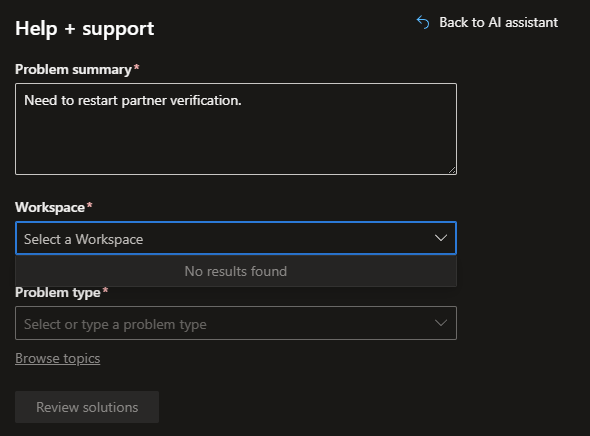
I tried again today and luckily Copilot set up the support request correctly and I was able to submit it. If you are also experiencing the Partner Center support infinite loop here are the choices that worked for me:
Developer, Student and Startup Programs
Windows Developer Center
Hardware Device Drivers
I am having this same problem. I have been able (after two weeks) to get a reply from Microsoft Support. They are now saying that I need to setup Verified Credentials:
Reynold, from your link these verified credentials appear to be issued by a so called “trusted ID verification vendor”. “Trusted” by whom I wonder? Certainly not by me.
Also isn’t the whole point of an EV certificate that the business associated with a Hardware Center account has already undergone verification from the certificate authority that issues the EV cert?
I agree, it seems like the vetting already in place (for almost 10 years) should be sufficient evidence that I and my company are trustworthy.
It get’s worse, Microsoft has chosen AU10TIX to be their trusted partner. You don’t have to search very far to find out that they have no idea what they are doing:
I really hope I’m just talking to the wrong people or AI and this gets straighten out another way.
Actually the more I read about them the scarier it gets. They appear to have had multiple controversies and hacks. Also note that they are not a US-based company.
It boggles the mind why Microsoft would choose this company for this purpose.
Last time I obtained an EV certificate it was, much to the chagrin of management, a much more difficult process even though we used the same company. We had to provide information about the company (Tax registration and Dunn and Bradstreet information) to get the certificate released. Company president had to sit in on a phone call. As we are a subsidiary we had to get the parent company involved. The whole thing reeked of an audit.
Some certificate providers have poor practices where they are not completely open about how they are going to bill or treat you. I have seen some posts where people race to the bottom for the cheapest EV certificate. I guess Microsoft, understandably, want to get the verification under their control.
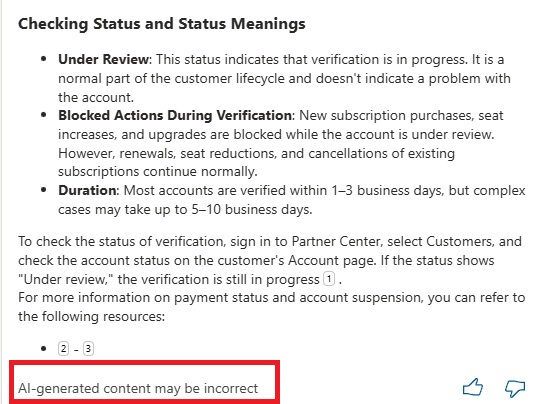
I just wish the could make the process clearer and we will comply. I took a screen grab this morning and saw this.
Yes AI information may well be incorrect so how about ensuring you give out information that leads to a proper and correct full process of how to get a company verified?
Yes, I am quite familiar with the process as I have to do it myself every so often. It is a PITA for sure, but at least it is done by certificate authorities which are usually well established companies with proven track record in the certificate space. Also the information that these companies want is at the company level and can be easily obtained by the state’s company registry and web directories.
Now we suddenly have to trust some fly-by-night operation with our private information such as our driving licenses and/or passports. I really hope Microsoft reverses this decision.
Just tried to login and got the message that my Partner Center account has been deactivated. I’m sure this will be joyous fun to straighten out. We already have to maintain an entirely separate existence with Microsoft for driver signing because Microsoft 365 for Government accounts can’t be used.
My IT opened a ticket through their portal and the person said they were not the right support and all they could do was tell me to call the general Microsoft number and ask for partner support. When you do that an automated voice tells you to go to aka.ms/partnertechnical (which is of no help) and then hangs up. If you call again you don’t even get the chance to ask something different. It plays the same message again and hangs up.
Really at a complete loss here on what to do. Seems Microsoft really does not want people to write drivers anymore.
Here is what worked for me: Instead of using Partner Center support I went to general developer support. I engaged the “Copilot AI” there and explained my problem. Eventually I got a link to submit a support request.
However this support request kept redirecting me back to Partner Center support and then again back to general support. I was able to break the infinite loop by selecting the following support options under general support:
Developer, Student and Startup Programs
Windows Developer Center
Hardware Device Drivers
At least now Microsoft has acknowledged my support request (although it has not been resolved yet).
A year ago we had a MS laptop warranty issue. After calling them and doing all the voice recognition menus, we got lock out via telephone the same way you described. Could not call them again.
Can’t remember if we waited a day or used a different phone number to call MS. We ignored all the menu questions and only persistently said: "I like to speak to a human". Eventually we got a real human which could help us.
@Bill_Zissimopoulos right before you posted that I managed to create a ticket using that method but mine was routed to “Developer Enrollment in Partner Center” rather than “Hardware Device Drivers”. That was Monday and I have received no response to the ticket.
@pwilly getting close to resorting to that. Have not tried to call back yet. I would assume it would reset every day.
It also appears we can now enroll in the Hardware program using our 365 Government domain. So that’s a potential path forward too. But from what people have said I would have to go buy a new EV cert to use with that enrollment and I still have a little over a year left on my current one.
Has anyone managed to successfully reverify with Microsoft?
My ticket was closed after telling me that I need to file an appeal through a new support request which I did. Since this new support request also went through Copilot I am not certain that I submitted it to the right place.
Surely there are enough of us with this problem that should make Microsoft take a closer look?
FYI, my account is an old SYSDEV account that has been migrated and reverified over the years. I am wondering if this problem is specific to SYSDEV accounts.
@GrimBeaver thank you. I wish I had seen your message earlier. My new support request was to “Account Management”.
Good luck, it took us many tickets and many tries to get things fixed.
Several notes:
Unfortunately the ID verification step via MS Authenticator is mandatory. Also make sure that you’re verified on both the Partner and Developer side.
Make sure that your partner account is correctly registered for the MAICPP program and there are no account suspensions on that. It’s not explicitly said but it’s a requirement of the hardware program.
It took us multiple tickets/calls and months of waiting before MS fixed our account. So gear up…
@Bill_Zissimopoulos I got an e-mail yesterday asking for a screenshot of the Legal Info page. Sent that, will see what comes of it. This is not a SYSDEV account. It’s an old Azure domain that was setup back around 2016 just for driver signing. Myself and my IT admin are the only active accounts in it.
@alxpaca never been registered for MAICPP. Just clicking on the registration I see there’s a check box for if you want to “Manufacture devices, parts and equipment. (Original Equipment Manufacturer, OEM)”. Wonder how many other people have joined that.
@Bill_Zissimopoulos I guessed that the verification was rejected on the Developer tab becaused I used the address of my remote location for that contact. I changed it to match the “legal” company address. That change triggered a restart of the verification which then completed successfully.
I had already done the AU10TIX routine.
I don’t have the Hardware workspace back though. Still trying to get another ticket going for that. The one time I got a support ticket started I got an email 20 hours later titled “Case xxx is closed. How did we do?“. It contained no explanation.