Hi all,
We are blocked on a Windows Hardware Dashboard / Partner Center driver signing issue and would appreciate advice from anyone who has seen this before, or from anyone familiar with the Microsoft driver signing pipeline.
Our Partner Center driver signing submissions fail during the scanning/signing stage with:
FileSigningFailed
FailDoNotRetry returned from Scan service. 4001 [errorInfo, BlockingDetectionFound]
or:
{"code":"4001","details":{"errorInfo":"BlockingDetectionFound"},"innerError":null}
The important point is that this does not only happen with our production driver.
To rule out our own code, we built an unmodified copy of Microsoft's official Windows-driver-samples:
Windows-driver-samples\filesys\miniFilter\nullFilter
The sample was built cleanly with VS2019 + WDK10, signed before submission, and submitted to Partner Center. It failed with the same error:
INF validation successful
Drivers passed Universal check successfully.
INF validation successful

Scanning Notes
{"code":"FileSigningFailed","details":{"error":"FailDoNotRetry returned from Scan service. 4001 [errorInfo, BlockingDetectionFound]"},"innerError":null}
This strongly suggests that the block is not caused by our minifilter driver code itself, but may be related to the Partner Center account, EV certificate, CAB package/signature chain, file reputation, or a false positive/internal policy in the signing scan pipeline.
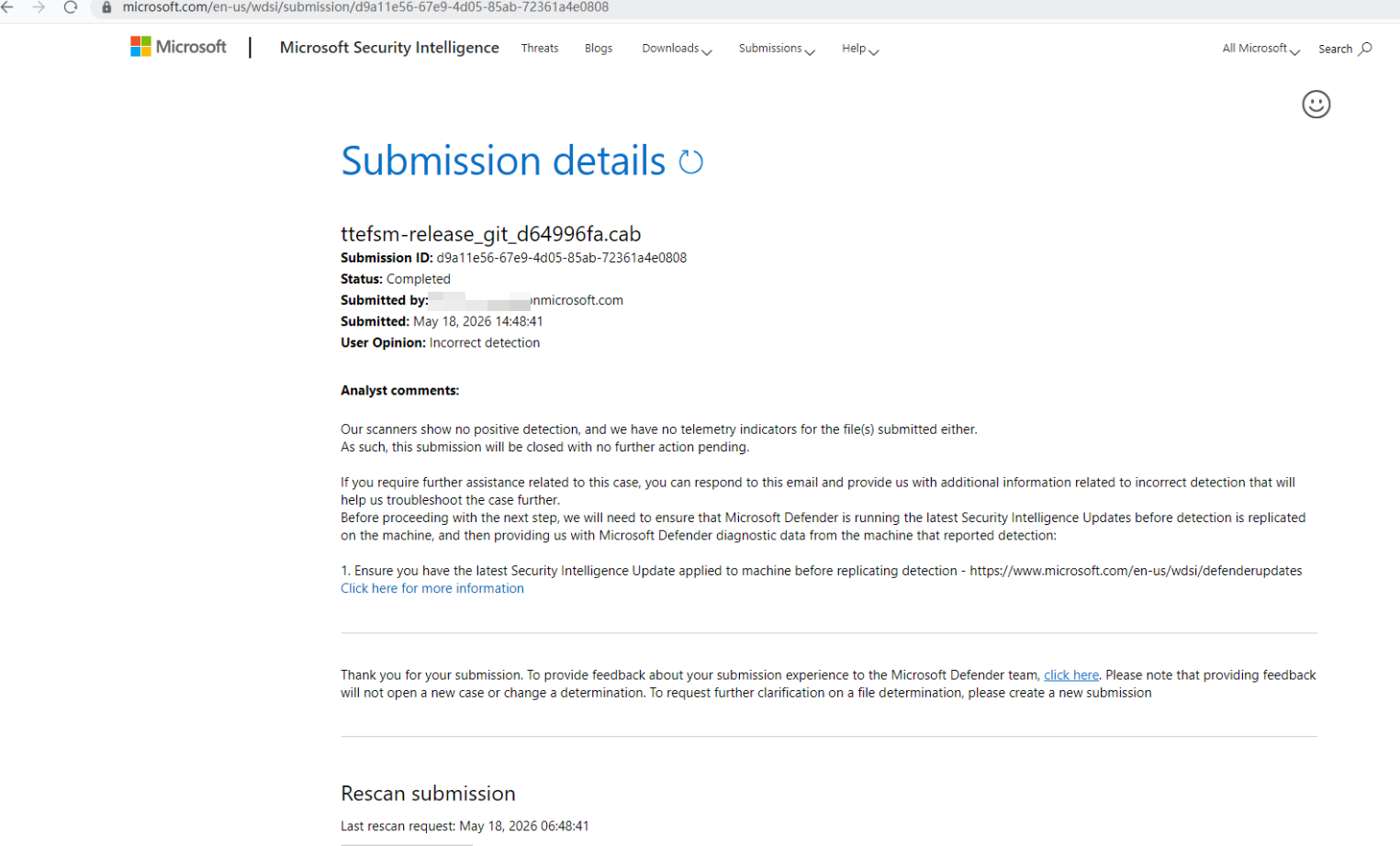
We also submitted the package to Microsoft Security Intelligence as an incorrect detection. The result came back as completed, with no positive detection reported for the submitted file.
So Microsoft Security Intelligence did not report a positive detection, but Partner Center Hardware Dashboard still blocks signing with 4001 BlockingDetectionFound.
We opened a Microsoft support case in early May 2026.
Timeline:
- May 5, 2026: Microsoft support acknowledged the 4001 driver signing issue and said the case was escalated to engineering.
- May 9, 2026: We reported that the Hardware Dashboard upload/signing path was blocked.
- May 18, 2026: We submitted the package to Microsoft Security Intelligence as an incorrect detection. The result came back with no positive detection.
- May 20, 2026: Microsoft support said the request had been escalated to the Hardware Engineering team.
- May 25, May 28, June 1, June 3, June 9, and June 11: We only received status updates saying the Hardware team was still reviewing or reactivating the Hardware account.
As of today, June 22, 2026, this has blocked us for more than a month. We cannot complete driver signing, which means we cannot ship our driver to customers. This is a complete business blocker for us, not a minimal-impact issue.
There is also a support access/account problem. When following the suggested Hardware support path, the account hits:
AADSTS90072: User account '<redacted>@<redacted>.onmicrosoft.com' from identity provider 'https://sts.windows.net/<tenant-id-redacted>/' does not exist in tenant 'Office 365' and cannot access the application '<app-id-redacted>' (WdcProd) in that tenant. The account needs to be added as an external user in the tenant first.
Partner Center also returns correlation IDs and correlation vectors for the failures, but I am not posting them publicly. I can provide the full Microsoft support case ID, submission ID, correlation IDs, timestamps, certificate thumbprint, and screenshots privately to Microsoft staff if needed.
Questions:
- Has anyone seen Partner Center return 4001 BlockingDetectionFound even for a clean Microsoft sample driver?
- Is this usually tied to the Partner Center account, EV certificate, CAB signature chain, submitted file hash, or internal Microsoft scan reputation?
- Is there any public remediation path when Microsoft Security Intelligence reports no detection but Hardware Dashboard signing still blocks the package?
- How can we get Microsoft to reclassify the support severity? The current handling appears to treat this as minimal impact, but our driver signing pipeline is completely blocked and this directly prevents customer delivery.
- Is the AADSTS90072 / WdcProd tenant issue likely related to the Hardware account reactivation problem, or is it a separate support portal access problem?
Any guidance on how to escalate this correctly would be appreciated. We are not looking to bypass Microsoft's signing checks; we need to understand what object is blocked and what remediation or false-positive clearance process is required.
Below is a sanitized summary of the Microsoft support email thread. I removed personal names, email addresses, company identifiers, tenant IDs, correlation IDs, submission IDs, and certificate information.
Sanitized Microsoft support email timeline:
May 5, 2026
Microsoft support acknowledged the case as a driver signing failure with 4001 error and said the case had been escalated to the engineering team for deeper investigation.
They requested the submission ID related to the driver signing submission.
May 9, 2026
We reported that we could no longer upload/sign drivers through the Hardware Dashboard path.
Partner Center returned an error when opening the Hardware Dashboard driver submission page. We provided Microsoft with the correlation information privately.
May 11, 2026
Microsoft support replied that they had updated the engineering team with the information we provided, and that they would notify us once they received any updates.
May 13, 2026
Microsoft support said they checked again with the engineering team and that the team was still troubleshooting the issue to find a permanent fix.
May 15, 2026
Microsoft support stated that the Hardware account had been suspended because the submitted code contained malware or potential vulnerabilities.
They instructed us to use the Hardware support path:
- Go to Windows developer support – Windows app development | Microsoft Developer
- Click Contact Us
- Sign in with a user associated with the HDC account in Partner Center
- Select Ask Copilot to receive email support
However, when we tried to follow this path, the support access itself failed with AADSTS90072 for the WdcProd application. The account could not access the target tenant/application and the message said the account needed to be added as an external user first.
May 18, 2026
We submitted the CAB package to Microsoft Security Intelligence as an incorrect detection.
The Microsoft Security Intelligence result later completed with no positive detection and no telemetry indicators for the submitted files.
We also informed Microsoft support that even a clean build of Microsoft's official Windows-driver-samples filesys\miniFilter\nullFilter sample, built with VS2019 + WDK10 and signed before submission, failed in Partner Center with the same 4001 BlockingDetectionFound / FileSigningFailed error.
This suggested the issue was not specific to our production driver code.
May 20, 2026
Microsoft support replied that the request had been escalated to the Hardware Engineering team for further review.
May 25, 2026
Microsoft support said they were still awaiting an update from the Hardware team, and that the review was ongoing.
May 28, 2026
Microsoft support again said the Hardware team was still reviewing the case and that they were awaiting the team's response.
June 1, 2026
Microsoft support said the Hardware team was still reviewing the case and that they were awaiting their response.
June 3, 2026
Microsoft support said they were checking with the Hardware team regarding activation of the Hardware account.
June 6, 2026
Microsoft support said they were still checking with the Hardware team for updates on the Hardware account activation.
June 9, 2026
We asked Microsoft support to escalate the case to the Hardware Dashboard / Hardware account activation team.
We explained that the issue completely blocked driver signing submissions, and that the same failure occurred even for Microsoft's official nullFilter sample.
We asked Microsoft to confirm whether the 4001 BlockingDetectionFound / FileSigningFailed result was related to account activation or backend scanning policy rather than the submitted driver package.
Microsoft support replied that the case had already been escalated to the Hardware team regarding the blocked Hardware account and was under investigation.
June 11, 2026
Microsoft support said they were still working with the Hardware team to explore reactivating the Hardware account.
Later the same day, Microsoft support said the Hardware team was still in the process of reactivating the account.
Current status as of June 22, 2026:
The issue has been open since early May 2026 and has blocked us for more than a month.
Partner Center driver signing remains blocked.
Microsoft Security Intelligence reported no positive detection for the submitted package.
A clean Microsoft nullFilter sample also fails with the same Partner Center 4001 BlockingDetectionFound / FileSigningFailed error.
The Hardware support access path also fails with AADSTS90072 / WdcProd tenant access issues.
We still do not know whether the block is tied to:
Partner Center account status
Hardware account activation
EV certificate reputation
CAB package/signature chain
submitted file hash
internal Hardware Dashboard scanning policy
false positive in the signing pipeline