With the latest Windows Updates (April 2026) installed, there are now UDP port exclusions being created by Windows automatically for UDP ports that may be in the 5xxxx range. For anybody who has VMs configured for kernel-mode network debugging with WinDbg (classic or store app), if you’ve chosen your port numbers based on existing WinDbg documentation which suggests port 50000, you may well encounter problems getting WinDbg to begin listening for incoming connections when you do “File → Kernel Debug…” (or CTRL+K), set the port & key values and click “OK”.
Example:
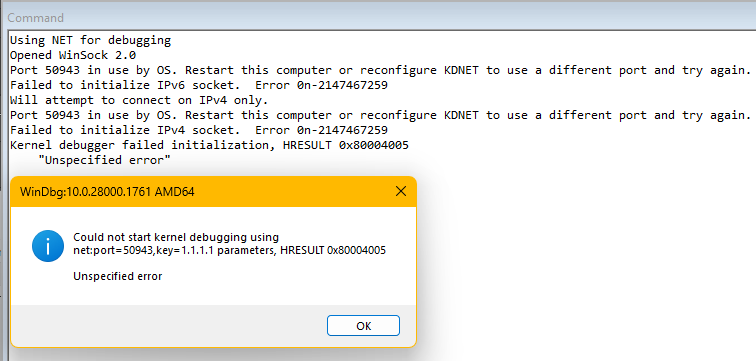
From a command prompt:
C:\>netsh int ipv4 show excludedportrange protocol=udp
Protocol udp Port Exclusion Ranges
Start Port End Port
 50865       50964
 50965       51064
 51065       51164
 51165       51264
 51265       51364
 51365       51464
 51465       51564
 51565       51664
 53170       53269

Apparently, these systems exclusion ranges are new and are used by the HNS & WinNAT services to reserve blocks of 100 UDP ports for their dynamic use at the system level, which is making then unavailable to other processes after those services have started.
The end result of this is that if a UDP port is in the system exclusion range, then WinDbg cannot utilize it for incoming kernel debugging network communications.
One recommended solution is to create/expand a persistent administered exclusion range. Apparently, the persistent administered exclusion ranges survive system reboots and are put into effect before the HNS & WinNAT services start creating their own system exclusion ranges, and when they do start, they’ll honor the persistent administrative exclusion ranges and work around them to create their own exclusion ranges.
For example, if the desired range of ports to reserve for WinDbg use is 50900 through 51599, the following commands would create the required reservation:
net stop winnat
net stop hns
netsh int ipv4 add excludedportrange protocol=udp startport=50900 numberofports=700 store=persistent
net start winnat
net start hns
Generally, it’s a good idea to provide exclusions for UDP ports that are configured in VMs so that you don’t play roulette with some other process dynamically allocating a port that is intended to be used with WinDbg, although you can usually get by without the reservation. However, with these dynamic system exclusions now getting defined to reserve 100’s of ports at a time, it can greatly increase the probability of encountering this issue.