How to make APO effects visible on speaker devices?

Hi guys.
I'm developing a Audio Processing Object(APO) to implement some sound effects on Windows.But I'm blocked to make the effects display on speaker like Dolby and DTS.

I implement a EFX APO and register it by .inf file, jusk like the microsoft sample "sysavd" does. I even signed the apo dll files.But after all things done, the effect still cannot display on the speaker device.

So can you tell me what I can do to make it appear. Just like this:

Hello Vinpay,

I am currently working on developing an MFX APO based on Microsoft’s Sysvad SwapAPO example. I successfully built the project using Visual Studio 2022 and created a custom INF file to register the APO in the system. I didnt build whole sysvad.sln and i only built the SwapAPO project. The DLL and INF files were signed, and installation was completed using the pnputil command without any errors.

I have verified in Driver Store that the DLL was copied correctly as part of the driver package installation, so the registration appears to be successful.

However, I am now stuck at the next step — how to activate and test the APO to ensure that the SwapAPO DLL is actually being loaded and its processing is being exercised by the audio engine.

Specifically, I am unsure about:

  • How to properly bind the MFX APO to a valid audio endpoint.

  • Is there any physical hardware driver inf requirement in oreder to make our MFX work.

  • How to confirm that Windows has instantiated the APO in the audio engine

  • Any recommended tools, registry checks, or verification procedures to make sure the APO is actually being called during audio playback/capture

Could you please guide me on the correct approach to test an MFX APO installed through an INF package?

Any help or reference documentation on this would be greatly appreciated.

Below is my inf file which is used to register the APO:

--- FILE: SwapAPO.inf (Child / Componentized APO INF)
; Component INF: installs the APO DLL and registers COM + AudioEngine properties
; This INF must be signed or install in test-signing mode (bcdedit /set testsigning on)

[Version]
Signature = "$WINDOWS NT$"
Class = AudioProcessingObject
ClassGuid = {5989fce8-9cd0-467d-8a6a-5419e31529d4}
Provider = %ProviderName%
DriverVer = 11/19/2025,1.0.0.0
CatalogFile = SwapAPO.cat
PnpLockDown = 1

[Manufacturer]
%MfgName% = ApoComponents,NTamd64

; The second field (SWC\VEN_SWAP&CID_APO) MUST match the parent created HWID
[ApoComponents.NTamd64]
%Apo.ComponentDesc% = ApoComponent_Install, SWC\VEN_SWAP&CID_APO

[ApoComponent_Install]
CopyFiles = Apo_CopyFiles
AddReg = Apo_AddReg

[Apo_CopyFiles]
swapapo.dll

[DestinationDirs]
Apo_CopyFiles = 13 ; DriverStore directory

; ------------------------------------------------------------------
; COM registration (HKR is device-relative so registrations are isolated in the driver package)
; ------------------------------------------------------------------
[Apo_AddReg]
HKR,Classes\CLSID%SWAP_FX_MODE_CLSID%,,,%MFX_FriendlyName%
HKR,Classes\CLSID%SWAP_FX_MODE_CLSID%\InProcServer32,,0x00020000,%13%\swapapo.dll
HKR,Classes\CLSID%SWAP_FX_MODE_CLSID%\InProcServer32,ThreadingModel,,"Both"

; Register APO with AudioEngine
HKR,AudioEngine\AudioProcessingObjects%SWAP_FX_MODE_CLSID%, "FriendlyName", ,%MFX_FriendlyName%
HKR,AudioEngine\AudioProcessingObjects%SWAP_FX_MODE_CLSID%, "Copyright", ,%Copyright%
HKR,AudioEngine\AudioProcessingObjects%SWAP_FX_MODE_CLSID%, "MajorVersion", 0x00010001, 1
HKR,AudioEngine\AudioProcessingObjects%SWAP_FX_MODE_CLSID%, "MinorVersion", 0x00010001, 0
HKR,AudioEngine\AudioProcessingObjects%SWAP_FX_MODE_CLSID%, "Flags", 0x00010001, 0xE
HKR,AudioEngine\AudioProcessingObjects%SWAP_FX_MODE_CLSID%, "MinInputConnections", 0x00010001, 1
HKR,AudioEngine\AudioProcessingObjects%SWAP_FX_MODE_CLSID%, "MaxInputConnections", 0x00010001, 1
HKR,AudioEngine\AudioProcessingObjects%SWAP_FX_MODE_CLSID%, "MinOutputConnections", 0x00010001, 1
HKR,AudioEngine\AudioProcessingObjects%SWAP_FX_MODE_CLSID%, "MaxOutputConnections", 0x00010001, 1
HKR,AudioEngine\AudioProcessingObjects%SWAP_FX_MODE_CLSID%, "MaxInstances", 0x00010001, 0xFFFFFFFF
HKR,AudioEngine\AudioProcessingObjects%SWAP_FX_MODE_CLSID%, "NumAPOInterfaces", 0x00010001, 1
HKR,AudioEngine\AudioProcessingObjects%SWAP_FX_MODE_CLSID%, "APOInterface0", ,"{FD7F2B29-24D0-4B5C-B177-592C39F9CA10}"

[ApoComponent_Install.HW]
AddReg = FriendlyName_AddReg

[FriendlyName_AddReg]
HKR,,FriendlyName,,%Apo.ComponentDesc%

[ApoComponent_Install.Services]
AddService = ,2 ; Null service

[SourceDisksNames]
1 = Disk

[SourceDisksFiles]
swapapo.dll = 1

[SignatureAttributes]
swapapo.dll = SignatureAttributes.PETrust

[SignatureAttributes.PETrust]
PETrust = true

[Strings]
ProviderName = "SwapAPO Dev Provider"
MfgName = "SwapAPO Dev Manufacturer"
Apo.ComponentDesc = "SwapAPO Mode Effect"
MFX_FriendlyName = "Swap Channels APO (Custom Build)"
Copyright = "SwapAPO Sample"
SWAP_FX_MODE_CLSID = "{06687E71-F043-403A-BF49-CB591BA6E103}"

Hi, Surya:

First, you need a extension inf to create a sub device from the hda And use script

“HKR,FX\0,%PKEY_FX_ModeEffectClsid%,,%FX_MODE_CLSID%“ to specify the apo you want the MFX to use.

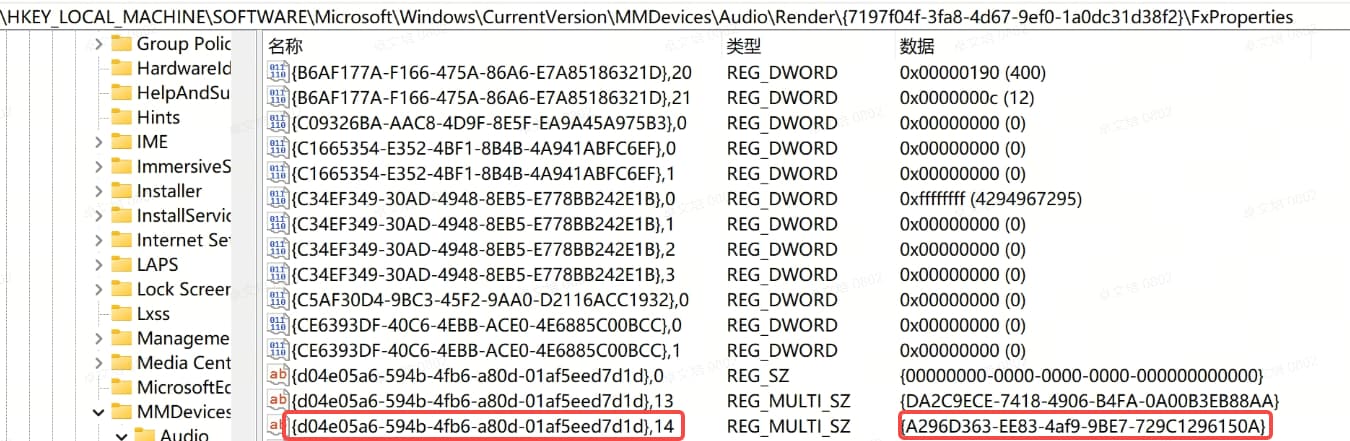
Installation of ext inf whill recreate the endpoits of the hda. As a result of the installation, you can find a registry in the path:

In this picture:

[7197f04f-…] is the instance id of the endpoint.

[{D04E05A6-594B-4fb6-A80D-01AF5EED7D1D},14] or [{D04E05A6-594B-4FB6-A80D-01AF5EED7D1D},6] is the key of MFX. And if you installation is correct, the registry value (here is [A296D363..]) is your MFX key.

Second, APO dll is just a COM component that loaded by audiodg.exe。If you want to check if the dll is loaded, you can use [Procmon.exe] to monitor the audiodg.exe while it is starting.

Hi Vinpay,

I already tried the process that you said with the extension inf and normal inf file for copying the SwapAPO.dll. Both the inf files are successfully installed. In my Registry, I found the exact entries that you have posted with your screenshot. As I am the new user, it is not allowing me to upload the screenshot. My registry values are as below at location : Computer\HKEY_LOCAL_MACHINE\SOFTWARE\Microsoft\Windows\CurrentVersion\MMDevices\Audio\Render{429448d3-1ee9-40a3-885e-b60697daaaca}\FxProperties

{d04e05a6-594b-4fb6-a80d-01af5eed7d1d},6 = {A296D363-EE83-4af9-9BE7-729C1296150A}

To my knowledge, i think my registry have to show {d04e05a6-594b-4fb6-a80d-01af5eed7d1d},6 = {06687E71-F043-403A-BF49-CB591BA6E103} instead of {A296D363-EE83-4af9-9BE7-729C1296150A} , since {06687E71-F043-403A-BF49-CB591BA6E103} is the CLSID of my SwapAPO MFX. Could you please clarify on this?

I also monitored in the Procmon.exe but the swapapo.dll is not in the stack.
All I want to know is weather my bothinf files are correct or not. could you please go through them. The below are the inf files that i used for installation:

Extension inf:
——————–
[Version]
Signature = "$WINDOWS NT$"
Class = Extension
ClassGuid = {e2f84ce7-8efa-411c-aa69-97454ca4cb57}
Provider = %ProviderName%
ExtensionId = {1d641578-54d2-404d-85de-79bb01461ac2}
DriverVer = 02/22/2016,1.0.0.1
CatalogFile = swapapoparent.cat
PnpLockDown = 1

[Manufacturer]
%MfgName% = DeviceExtensions,NTAMD64

[DeviceExtensions.NT$ARCH$.10.0...22621]
%Device.ExtensionDesc% = DeviceExtension_Install, HDAUDIO\FUNC_01&VEN_10EC&DEV_0255&SUBSYS_102807A1

[DeviceExtension_Install]

[DeviceExtension_Install.HW]
AddReg = FriendlyName_AddReg

[FriendlyName_AddReg]
HKR,,FriendlyName,,%ExtendedFriendlyName%

[DeviceExtension_Install.Components]
AddComponent = SwapApo,,Apo_AddComponent

[Apo_AddComponent]
ComponentIDs = VEN_SMPL&CID_APO
Description = "Swap APO MFX Component"

[DeviceExtensions.I.APO]
AddReg = APO.I.Association0.AddReg

;======================================================
; APO per-interface registry
;======================================================
[APO.I.Association0.AddReg]
; Instruct audio endpoint builder to set the CLSIDs for stream, mode, and endpoint APOs
; into the effects property store
HKR,FX\0,%PKEY_FX_Association%,,%KSNODETYPE_ANY%
HKR,FX\0,%PKEY_FX_ModeEffectClsid%,,%SWAP_FX_MODE_CLSID%
;HKR,FX\0,%PKEY_CompositeFX_ModeEffectClsid%,,%SWAP_FX_MODE_CLSID%

; Driver developer would replace the list of supported processing modes here
; Concatenate GUIDs for DEFAULT, MEDIA, MOVIE stream effects
HKR,FX\0,%PKEY_MFX_ProcessingModes_Supported_For_Streaming%,%REG_MULTI_SZ%,%AUDIO_SIGNALPROCESSINGMODE_COMMUNICATIONS%

[DeviceExtensions.I.TopologyMicArray2]
AddReg=DeviceExtensions.I.TopologyMicArray2.AddReg

[DeviceExtensions.I.TopologyMicArray2.AddReg]
; Uncomment the following lines to mark the rear microphone array as a far field microphone.
;HKR,EP\1,%PKEY_AudioEndpoint_Association%,,%KSNODETYPE_ANY%
;HKR,EP\1,%PKEY_Devices_AudioDevice_Microphone_IsFarField%,0x00010001,0x1

HKR,FX\0,%PKEY_FX_Association%,,%KSNODETYPE_ANY%

[DeviceExtension_Install.Interfaces]
; Interfaces for speaker (internal) render endpoint.
AddInterface = %KSCATEGORY_AUDIO%, %KSNAME_TopologySpeaker%, DeviceExtensions.I.APO
AddInterface = %KSCATEGORY_TOPOLOGY%, %KSNAME_TopologySpeaker%, DeviceExtensions.I.APO

[Strings]
MfgName = "SWAP_APO Manufacturer"
ProviderName = "SWAP_APO Provider"
Device.ExtensionDesc = "Swap APO MFX Extension"
ExtendedFriendlyName = "Realtek Speaker with Swap APO MFX"

PKEY_FX_Association = "{D04E05A6-594B-4FB6-A80D-01AF5EED7D1D},0"
PKEY_FX_ModeEffectClsid = "{D04E05A6-594B-4fb6-A80D-01AF5EED7D1D},6"
PKEY_MFX_ProcessingModes_Supported_For_Streaming = "{D3993A3F-99C2-4402-B5EC-A92A0367664B},6"
PKEY_CompositeFX_ModeEffectClsid = "{D04E05A6-594B-4fb6-A80D-01AF5EED7D1D},14"

; Driver developers would replace these CLSIDs with those of their own APOs
SWAP_FX_MODE_CLSID = "{06687E71-F043-403A-BF49-CB591BA6E103}"

; ===== Kernel Streaming IDs =====
KSNODETYPE_ANY = "{00000000-0000-0000-0000-000000000000}"

KSNAME_TopologySpeaker = "TopologySpeaker"

KSCATEGORY_AUDIO = "{6994AD04-93EF-11D0-A3CC-00A0C9223196}"
KSCATEGORY_TOPOLOGY = "{DDA54A40-1E4C-11D1-A050-405705C10000}"

REG_MULTI_SZ = 0x00010000 ; FLG_ADDREG_TYPE_MULTI_SZ

AUDIO_SIGNALPROCESSINGMODE_COMMUNICATIONS = "{98951333-B9CD-48B1-A0A3-FF40682D73F7}"
———————————————————————————————————————————

APO inf :
————
[Version] ; Standard INF version section (required in all INFs)
Signature = "$WINDOWS NT$" ; Required magic string for Windows NT-family OSs
Class = AudioProcessingObject ; This is NOT a PnP device class like "Media", it's the APO class
ClassGuid = {5989fce8-9cd0-467d-8a6a-5419e31529d4} ; GUID that identifies the AudioProcessingObject class
Provider = %ProviderName%
DriverVer = 02/22/2016,1.0.0.1
CatalogFile = swapapo.cat ;Name of the .cat file that signs this INF
PnpLockDown = 1

[Manufacturer]
%MfgName% = ApoComponents,NTAMD64

;[ApoComponents.NT$ARCH$.10.0...22621]
[ApoComponents.NTamd64]
%Apo.ComponentDesc% = ApoComponent_Install,SWC\VEN_SMPL&CID_APO

;[ApoComponent_Install]
[ApoComponent_Install].NT]
CopyFiles = Apo_CopyFiles
AddReg = Apo_AddReg

[Apo_CopyFiles]
swapapo.dll

[Apo_AddReg]
; Swap Mode effect APO COM registration
HKR,Classes\CLSID%SWAP_FX_MODE_CLSID%,,,%MFX_FriendlyName%
HKR,Classes\CLSID%SWAP_FX_MODE_CLSID%\InProcServer32,,0x00020000,%13%\swapapo.dll
HKR,Classes\CLSID%SWAP_FX_MODE_CLSID%\InProcServer32,ThreadingModel,,"Both"

; Swap Mode effect APO registration
HKR,AudioEngine\AudioProcessingObjects%SWAP_FX_MODE_CLSID%, "FriendlyName", ,%MFX_FriendlyName%
HKR,AudioEngine\AudioProcessingObjects%SWAP_FX_MODE_CLSID%, "Copyright", ,%Copyright%
HKR,AudioEngine\AudioProcessingObjects%SWAP_FX_MODE_CLSID%, "MajorVersion", 0x00010001, 1
HKR,AudioEngine\AudioProcessingObjects%SWAP_FX_MODE_CLSID%, "MinorVersion", 0x00010001, 1
HKR,AudioEngine\AudioProcessingObjects%SWAP_FX_MODE_CLSID%, "Flags", 0x00010001, %APO_FLAG_DEFAULT%
HKR,AudioEngine\AudioProcessingObjects%SWAP_FX_MODE_CLSID%, "MinInputConnections", 0x00010001, 1
HKR,AudioEngine\AudioProcessingObjects%SWAP_FX_MODE_CLSID%, "MaxInputConnections", 0x00010001, 1
HKR,AudioEngine\AudioProcessingObjects%SWAP_FX_MODE_CLSID%, "MinOutputConnections", 0x00010001, 1
HKR,AudioEngine\AudioProcessingObjects%SWAP_FX_MODE_CLSID%, "MaxOutputConnections", 0x00010001, 1
HKR,AudioEngine\AudioProcessingObjects%SWAP_FX_MODE_CLSID%, "MaxInstances", 0x00010001, 0xffffffff
HKR,AudioEngine\AudioProcessingObjects%SWAP_FX_MODE_CLSID%, "NumAPOInterfaces", 0x00010001, 1
HKR,AudioEngine\AudioProcessingObjects%SWAP_FX_MODE_CLSID%, "APOInterface0", ,"{FD7F2B29-24D0-4B5C-B177-592C39F9CA10}"

[ApoComponent_Install.HW]
AddReg = FriendlyName_AddReg

[FriendlyName_AddReg]
HKR,,FriendlyName,,%Apo.ComponentDesc%

[ApoComponent_Install.Services]
AddService=,2 ; no function driver, install a null driver.

[SourceDisksNames]
1 = Disk

[SourceDisksFiles]
swapapo.dll = 1

[DestinationDirs]
Apo_CopyFiles = 13 ; 13=Package's DriverStore directory

[SignatureAttributes]
swapapo.dll = SignatureAttributes.PETrust

[SignatureAttributes.PETrust]
PETrust = true

[Strings]
MfgName = "SWAP_APO Manufacturer"
ProviderName = "SWAP_APO Provider"
Apo.ComponentDesc = "Audio Proxy APO Sample"

; CLSID of our Mode APO COM object
SWAP_FX_MODE_CLSID = "{06687E71-F043-403A-BF49-CB591BA6E103}"

; see audioenginebaseapo.idl for APO_FLAG enum values
APO_FLAG_DEFAULT = 0x0000000e

MFX_FriendlyName = "Audio Proxy APO Sample (mode effect)"
Copyright = "Sample"
—————————————————————————————————————————

I would greatly appreciate your confirmation on whether my INF files are correct or if any modifications are required to ensure my MFX is correctly bound and loaded by audiodg.exe.

Thank you very much for your time and guidance.

Best regards,
Surya.
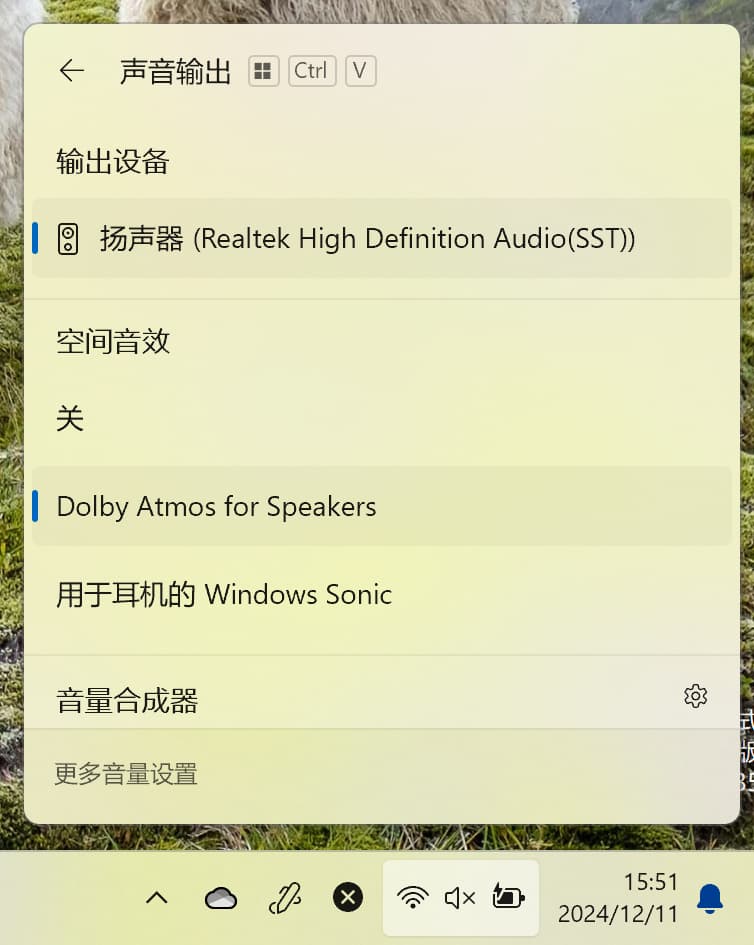
I think you should check the topology name of the two script.

It must be the real topolygy name of your hda.

for example, if your apo is applied on windows that install in vmware, the script should be:

;VM
AddInterface = %KSCATEGORY_AUDIO%, eLineOutTopo, DeviceExtensions.I.APO
AddInterface = %KSCATEGORY_TOPOLOGY%, eLineOutTopo, DeviceExtensions.I.APO

If there is a default apo driver for the hda on your device, the most effective approach is to refer to the writing method of its extended driver.

Hi Vinpay,

I changed the inf file as you said. I found Realtek inf in C:\Windows\INF\ path in my system and found below lines in the Realtek inf file.

AddInterface=%KSCATEGORY_AUDIO%,%KSNAME_PrimaryLineOutTopo%, IntcAzAudModel.PrimaryLineOutTopo
AddInterface=%KSCATEGORY_TOPOLOGY%,%KSNAME_PrimaryLineOutTopo%, IntcAzAudModel.PrimaryLineOutTopo

KSNAME_PrimaryLineOutTopo="PrimaryLineOutTopo"

Taking the above Realtek inf “AddInterface” as reference, I modified my extension inf as below:

[DeviceExtension_Install.Interfaces]
; Interfaces for speaker (internal) render endpoint.
AddInterface = %KSCATEGORY_AUDIO%, %KSNAME_TopologySpeaker%, DeviceExtensions.I.APO
AddInterface = %KSCATEGORY_TOPOLOGY%, %KSNAME_TopologySpeaker%, DeviceExtensions.I.APO

[Strings]
KSNODETYPE_ANY = "{00000000-0000-0000-0000-000000000000}"

KSNAME_TopologySpeaker = "PrimaryLineOutTopo"

KSCATEGORY_AUDIO = "{6994AD04-93EF-11D0-A3CC-00A0C9223196}"
KSCATEGORY_TOPOLOGY = "{DDA54A40-1E4C-11D1-A050-405705C10000}"

REG_MULTI_SZ = 0x00010000 ; FLG_ADDREG_TYPE_MULTI_SZ

AUDIO_SIGNALPROCESSINGMODE_COMMUNICATIONS = "{98951333-B9CD-48B1-A0A3-FF40682D73F7}"

I tried reinstallation again with above changes but still not found any lead in the APO Installation process.
What might be missing from myside?

Are your drivers signed by WHQL?

If not, the device created by your ext driver will not load the apo driver automaticly.

You can load the driver manually.

Find the sub device of your hda with the id “SWC\VEN_SMPL&CID_APO“, then select the apo driver as it driver.

This is great info, and it should be stored someplace where it can be found. APOs are a very useful tool, but APO installation has ALWAYS been a form of dark magic, requiring strange incantations and sometimes a sacrifice. A few “practical guide” pages would be an enormous resource.

I think I am missing something with the registration and installation procedure using inf files. So I want to halt the signing, registration and installation process for a while.

Now I thought of creating a test application to test the SwapAPO.dll functionality by providing a input.wav file. My intention is to build a simple user-mode test application which:

  • Loads the generated swapapo.dll

  • Creates the APO instance

  • Calls APOProcess() directly

  • Provides an input.wav file as input

  • Generates an output.wav file as output (with the channels swapped)

This will help me confirm that the SwapAPO processing itself is working correctly before integrating it into the live Windows audio pipeline.

Could you please confirm:

  1. Whether this kind of offline test application approach is valid for Sysvad SwapAPO?

  2. If so, is it sufficient to drive APOProcess() with floating-point stereo buffers derived from a WAV file?

  3. Are there any specific initialization steps you would recommend for this type of standalone testing?

  4. Do I need to use Initialize(), LockforProcess(), UnlockforProcess() in the test application

There are structures like WAVEFORMATEXTENSIBLE, APOInitSystemEffects3 which usually gets filled by Windows Audio Engine. Now if our intention is to create a test application, we need to manually fill these structures because SwapAPO.dll is not loaded by Windows Audio Engine in our case.

My question is is this right approach or I need to invest the time on registering and installing the APO using inf files.

I do not recommend to test APO function in this way. The reasons are as follows:

1. A complete APO needs to implement more than just the APOProcess interface. Simply calling APOProcess in a simulation environment does not guarantee that your implementation is effective.

2 The input data of the APOProcess is quite complicated and would be difficult to handle even with the simulator when you don't have a thorough understanding of APO.

If you merely want to verify whether the function of APO is working properly, I suggest you make modifications based on the open-source software Equalizer APO.

The apo registration method used by Equalizer is not the one currently recommended by Microsoft. It registers APO as a global APO, and then modifies the existing endpoint's property [{D04E05A6-594B-4FB6-A80D-01AF5EED7D1D}, 6] value to Equalizer MFX APO GUID.(SFX/EFX in the same way)

This register method has a major drawback. When your endpoint is regenerated for some reason, the apo may become invalid and needs to be reconfigured. However, for beginners who are developing and debugging a APO, this way is relatively simple and user-friendly.

Hello Vinpay,

I am working on building and running the SwapAPO sample from Microsoft SYSVAD (GitHub) and I would like some guidance to understand the behavior I am seeing.

What I did:

  1. Built the SwapAPO sample successfully.

  2. Created and installed:

    • Component INF (AudioProcessingObject class)

    • Extension INF (bound to Realtek HDAUDIO hardware ID which appeares in Device Manager under Sound, Video and game controllers)

I installed them using:

pnputil /add-driver SwapAPO.inf
pnputil /add-driver SwapAPOParent.inf /install

Installation succeeded without errors.


Observed behavior:

  • Component INF installs correctly

  • Extension INF binds to my Realtek audio device

  • Realtek(R) audio was renamed to Realtek Speaker with Swap APO MFX

  • After inf files got installed, Device Manager shows:

    Sound, video and game controllers
    → Realtek Speaker with Swap APO MFX (previously - Realtek(R) audio)


Issue:

The SwapAPO sample is expected to swap left and right audio channels.

However:

  • When playing stereo test audio (YouTube left/right sound test), There is no audible channel swap.

  • Audio output remains normal

    My questions :

  1. SWAP_FX_MODE_CLSID = "{06687E71-F043-403A-BF49-CB591BA6E103}"
    where i can find the value after installation of inf files.

  2. Will any device gets registered in Device Manager under Software Components.

  3. Are there any additional INF or processing-mode requirements to make my inf files work.

Below are my component and Extension INF files, please go through them for clarification on my experimentations.

——————————————————————————————————————————–
//Component inf
————————
[Version] ; Standard INF version section (required in all INFs)
Signature = "$WINDOWS NT$" ; Required magic string for Windows NT-family OSs
Class = AudioProcessingObject ; This is NOT a PnP device class like "Media", it's the APO class
ClassGuid = {5989fce8-9cd0-467d-8a6a-5419e31529d4} ; GUID that identifies the AudioProcessingObject class
;Class = SoftwareComponent
;ClassGuid = {5c4c3332-344d-483c-8739-259e934c9cc8}
Provider = %ProviderName%
DriverVer = 02/22/2016,1.0.0.1
CatalogFile = swapapo.cat ;Name of the .cat file that signs this INF
PnpLockDown = 1

[Manufacturer]
%MfgName% = ApoComponents,NTAMD64 ;all system inf choosed NTAMD64

;[ApoComponents.NT$ARCH$.10.0...22621]
[ApoComponents.NTamd64]
;Declares a software component (SWC) device & Maps that SWC ID to an Install section
%Apo.ComponentDesc% = ApoComponent_Install,SWC\VEN_SMPL&CID_APO

[ApoComponent_Install]
CopyFiles = Apo_CopyFiles
AddReg = Apo_AddReg

[Apo_CopyFiles]
swapapo.dll

[Apo_AddReg]
; Swap Mode effect APO COM registration
HKR,Classes\CLSID%SWAP_FX_MODE_CLSID%,,,%MFX_FriendlyName%
HKR,Classes\CLSID%SWAP_FX_MODE_CLSID%\InProcServer32,,0x00020000,%13%\swapapo.dll
HKR,Classes\CLSID%SWAP_FX_MODE_CLSID%\InProcServer32,ThreadingModel,,"Both"

; Swap Mode effect Audio Engine APO registration
HKR,AudioEngine\AudioProcessingObjects%SWAP_FX_MODE_CLSID%, "FriendlyName", ,%MFX_FriendlyName%
HKR,AudioEngine\AudioProcessingObjects%SWAP_FX_MODE_CLSID%, "Copyright", ,%Copyright%
HKR,AudioEngine\AudioProcessingObjects%SWAP_FX_MODE_CLSID%, "MajorVersion", 0x00010001, 1
HKR,AudioEngine\AudioProcessingObjects%SWAP_FX_MODE_CLSID%, "MinorVersion", 0x00010001, 1
HKR,AudioEngine\AudioProcessingObjects%SWAP_FX_MODE_CLSID%, "Flags", 0x00010001, %APO_FLAG_DEFAULT%
HKR,AudioEngine\AudioProcessingObjects%SWAP_FX_MODE_CLSID%, "MinInputConnections", 0x00010001, 1
HKR,AudioEngine\AudioProcessingObjects%SWAP_FX_MODE_CLSID%, "MaxInputConnections", 0x00010001, 1
HKR,AudioEngine\AudioProcessingObjects%SWAP_FX_MODE_CLSID%, "MinOutputConnections", 0x00010001, 1
HKR,AudioEngine\AudioProcessingObjects%SWAP_FX_MODE_CLSID%, "MaxOutputConnections", 0x00010001, 1
HKR,AudioEngine\AudioProcessingObjects%SWAP_FX_MODE_CLSID%, "MaxInstances", 0x00010001, 0xffffffff
HKR,AudioEngine\AudioProcessingObjects%SWAP_FX_MODE_CLSID%, "NumAPOInterfaces", 0x00010001, 1
HKR,AudioEngine\AudioProcessingObjects%SWAP_FX_MODE_CLSID%, "APOInterface0", ,"{FD7F2B29-24D0-4B5C-B177-592C39F9CA10}"

[ApoComponent_Install.HW]
AddReg = FriendlyName_AddReg

[FriendlyName_AddReg]
HKR,,FriendlyName,,%Apo.ComponentDesc%

[ApoComponent_Install.Services]
AddService=,2 ; no function driver, install a null driver.

[SourceDisksNames]
1 = Disk

[SourceDisksFiles]
swapapo.dll = 1

[DestinationDirs]
Apo_CopyFiles = 13 ; 13=Package's DriverStore directory

[SignatureAttributes]
swapapo.dll = SignatureAttributes.PETrust

[SignatureAttributes.PETrust]
PETrust = true

[Strings]
MfgName = "SWAP_APO Manufacturer"
ProviderName = "SWAP_APO Provider"
Apo.ComponentDesc = "Audio Proxy APO Sample"

; CLSID of our Mode APO COM object
SWAP_FX_MODE_CLSID = "{06687E71-F043-403A-BF49-CB591BA6E103}"

; see audioenginebaseapo.idl for APO_FLAG enum values
APO_FLAG_DEFAULT = 0x0000000e

MFX_FriendlyName = "Audio Proxy APO Sample (mode effect)"
Copyright = "Sample"

———————————————————————————————————————————-

//Extension inf:
———————
[Version]
Signature = "$WINDOWS NT$"
Class = Extension
ClassGuid = {e2f84ce7-8efa-411c-aa69-97454ca4cb57}
Provider = %ProviderName%
ExtensionId = {1d641578-54d2-404d-85de-79bb01461ac2}
DriverVer = 02/22/2016,1.0.0.1
CatalogFile = swapapoparent.cat
PnpLockDown = 1

[Manufacturer]
%MfgName% = DeviceExtensions,NTAMD64 ;all system inf choosed NTAMD64

;[DeviceExtensions.NT$ARCH$.10.0...22621]
;[DeviceExtensions.NT$ARCH$.NTamd64]
[DeviceExtensions.NTamd64]
%Device.ExtensionDesc% = DeviceExtension_Install, HDAUDIO\FUNC_01&VEN_10EC&DEV_0255&SUBSYS_102807A1

[DeviceExtension_Install]

[DeviceExtension_Install.HW]
AddReg = FriendlyName_AddReg

[FriendlyName_AddReg]
HKR,,FriendlyName,,%ExtendedFriendlyName%

[DeviceExtension_Install.Components]
AddComponent = SwapApo,,Apo_AddComponent ;Tells windows to attach this component

[Apo_AddComponent]
ComponentIDs = VEN_SMPL&CID_APO
Description = "Swap APO MFX Component"

[DeviceExtensions.I.APO]
AddReg = APO.I.Association0.AddReg

;======================================================
; APO per-interface registry
;======================================================
[APO.I.Association0.AddReg]
; Instruct audio endpoint builder to set the CLSIDs for stream, mode, and endpoint APOs
; into the effects property store
HKR,FX\0,%PKEY_FX_Association%,,%KSNODETYPE_ANY%
HKR,FX\0,%PKEY_FX_ModeEffectClsid%,,%SWAP_FX_MODE_CLSID%
; Driver developer would replace the list of supported processing modes here
; Concatenate GUIDs for DEFAULT, MEDIA, MOVIE stream effects
HKR,FX\0,%PKEY_MFX_ProcessingModes_Supported_For_Streaming%,%REG_MULTI_SZ%,%AUDIO_SIGNALPROCESSINGMODE_COMMUNICATIONS%

[DeviceExtensions.I.TopologyMicArray2]
AddReg=DeviceExtensions.I.TopologyMicArray2.AddReg

[DeviceExtensions.I.TopologyMicArray2.AddReg]
HKR,FX\0,%PKEY_FX_Association%,,%KSNODETYPE_ANY%

[DeviceExtension_Install.Interfaces]
; Interfaces for speaker (internal) render endpoint.

AddInterface = %KSCATEGORY_AUDIO%, %KSNAME_TopologySpeaker%, DeviceExtensions.I.APO
AddInterface = %KSCATEGORY_RENDER%, %KSNAME_TopologySpeaker%, DeviceExtensions.I.APO

AddInterface = %KSCATEGORY_AUDIO%, %KSNAME_TopologySpeaker%, DeviceExtensions.I.APO
AddInterface = %KSCATEGORY_TOPOLOGY%, %KSNAME_TopologySpeaker%, DeviceExtensions.I.APO

[Strings]
MfgName = "SWAP_APO Manufacturer"
ProviderName = "SWAP_APO Provider"
Device.ExtensionDesc = "Swap APO MFX Extension"
ExtendedFriendlyName = "Realtek Speaker with Swap APO MFX"

PKEY_FX_Association = "{D04E05A6-594B-4FB6-A80D-01AF5EED7D1D},0"
PKEY_FX_ModeEffectClsid = "{D04E05A6-594B-4fb6-A80D-01AF5EED7D1D},6"
PKEY_MFX_ProcessingModes_Supported_For_Streaming = "{D3993A3F-99C2-4402-B5EC-A92A0367664B},6"
PKEY_CompositeFX_ModeEffectClsid = "{D04E05A6-594B-4fb6-A80D-01AF5EED7D1D},14"

; Driver developers would replace these CLSIDs with those of their own APOs
SWAP_FX_MODE_CLSID = "{06687E71-F043-403A-BF49-CB591BA6E103}"

; ===== Kernel Streaming IDs =====
KSNODETYPE_ANY = "{00000000-0000-0000-0000-000000000000}"

KSNAME_TopologySpeaker = "PrimaryLineOutTopo"

KSCATEGORY_AUDIO = "{6994AD04-93EF-11D0-A3CC-00A0C9223196}"
KSCATEGORY_TOPOLOGY = "{DDA54A40-1E4C-11D1-A050-405705C10000}"

REG_MULTI_SZ = 0x00010000 ; FLG_ADDREG_TYPE_MULTI_SZ

AUDIO_SIGNALPROCESSINGMODE_COMMUNICATIONS = "{98951333-B9CD-48B1-A0A3-FF40682D73F7}"
——————————————————————————————————————————

Thank you for your time.

Best regards,
Surya