HLKX package submission failed during driver signing - error report log is not helpful

I got my problems resolved regarding CodeQL and “Static Tools Logo Test” issues and my HLK tests all completed successfully across the board for x64 & ARM64 builds of my driver.

After preparing the merged HLKX packages and submitting them through the hardware center, the ARM64 packages were automatically processed and approved within an hour. However, the x64 packages, which are substantially larger as they include merged HLK test results for a much larger number of builds of Windows, passed manual review and then apparently failed during driver signing due to an unspecified error. There is a line of red text displayed “You can download your full error report here for more information about what went wrong and how to fix the issue”.

When I click the link and download the text file, all it contains is the following:

INF validation successful

INF validation successful

Drivers passed Universal check successfully.
INF validation successful

Scanning Notes
{"code":"FileSigningFailed","details":{"error":"FailDoNotRetry returned from Scan service. 4001 [errorInfo, BlockingDetectionFound]"},"innerError":null}

Does anybody know how to interpret that in a way which would be meaningful for identifying what remediation steps, if any, can be taken to resolve the problem?


What I’m about to say is not particularly helpful since I’ve not personally seen this problem, nor do the symptoms match. However the message BlockingDetectionFound makes me think about the recently introduced Publishing Blocklist Enforcement (see this blog post).

Going forward, if a signing submission contains a file that appears on the Publishing Blocklist, the submission will be rejected before the driver is signed. Partners will receive an error identifying the problematic file so they can take corrective action.

Although, what is said later in that post doesn’t match your screenshot or error report. Specifically:

If your submission contains a blocklisted file, it will fail at the Validation stage. The error report will include a message identifying the specific file and version:

"The driver submission has been rejected because file name: [filename] with version: [version] is blocked."

Your submission failed much later than Validation, and the message doesn’t identify any file.

I decided to re-submit the exact same HLKX packages, and, once again, the ARM64 builds of my driver were automatically approved and signed in less than an hour. This time, for the x64 builds, instead of the code signing error which appeared to be fatal, I see the following stuck in “Manual review” status:

What is the process for contacting Microsoft to determine exactly what in the HLKX package is causing a manual review process to be required? I’ve had this happen in the past and it takes them 6 to 7 days to eventually approve and sign the driver, which is unacceptably long if a bug-fix for a serious problem needed to be implemented and an updated driver delivered to a customer. If there was some visibility into the root-cause for this issue, then at least I could take steps to eliminate whatever it is that’s requiring the manual review to speed up the process.

From what was previously written on this forum and other places on the internet, the “BlockingDetectionFound“ error most likely means that their scan suspects the driver (or other code in your package) to be either malicious or obfuscated. That would also explain why they don’t give you additional information on how to fix it.

I personally didn’t encounter this before so I can’t tell you how to fix it. It’s probably best to contact support directly.

I had Windows Defender scan all 4 builds of the driver [Release|Debug] x [x64|ARM64], and it declared them free of malware.

I don’t use any kind of obfuscator for driver source code or for the binary that’s built via the compiler & linker.

What it leaves me with is the possibility that there’s a random byte pattern which triggers a false positive. Remember, the ARM64 builds of the driver don’t get this error; it’s only the x64 builds.

The HLK testing for ARM64 only have the involves the playlist of tests required for Windows 11 24H2 / 25H2 / 26H1, with 2 separate HLKX packages merged together to create a combined HLKX package which then gets signed with our EVCS in a build pipeline and then gets submitted to Microsoft for signing. For x64, however, there’s Windows 11 23H2 / 24H2 / 25H2, along with Windows Server 2016 / 2019 / 2022 / 2025 and then Windows 10 22H2. Suspecting that maybe the down-level test results could be causing 6 to 7 day long “manual review” step, I rebuilt the driver with a new version, re-ran the HLK tests, and then made merged HLKX packages omitting the results for Windows 10 22H2 & Windows Server 2016. That package, when submitted, progressed directly through to the “Sign” stage in less than an hour and then failed code signing again as described above. So it looks like eliminating the down-level testing results helped eliminate the extended manual review but still didn’t resolve the signing failure.

Possibly Microsoft is not using only Windows Defender. Also, most likely Windows virus scanners are still “optimized“ for x86/x64 code, and not for ARM64 code (yet).

Consider to scan your drivers at VirusTotal before submitting. There you have about 70 scanners and some might flag a false / positive.

thanks! doing so now. will report back on the findings.

For the Release|x64 build, the report shows zero detections for all the different vendor’s AV products.

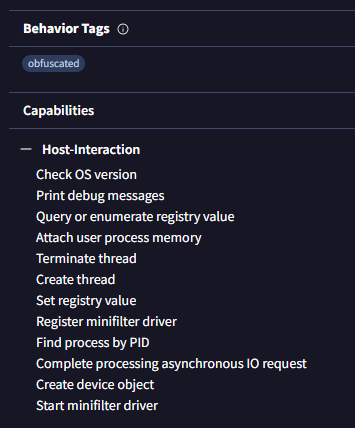
Behavior analysis is the only thing that provides any level of detail, and I’m trying identify which of them, if any, would be the root-cause for the failure.

It’s not clear what “obfuscated” signifies in this situation.

Nothing from “Host-Interaction” seems like it should be of concern.

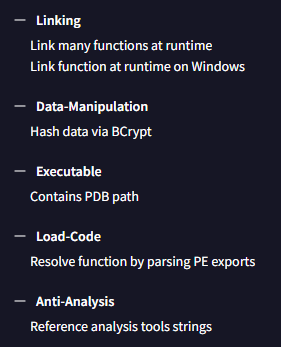
For “Linking”, the driver is intended to run on Windows Server 2016 through Windows Server 2025, Windows 10 22H2 and Windows 11 23H2 / 24H2 / 25H2 / 26H1, and there are a variety of kernel-mode API functions which don’t exist at various down-level builds of Windows. To deal with that issue, MmGetSystemRoutineAddress() is called to obtain function pointers, when available, for “optional” functions, and then the driver adjusts its behavior accordingly.

For “Data-Manipulation” and usage of BCrypt, a service SID value is computed from a service name, and then when an IRP_MJ_CREATE is being handled, the access token of the process performing the operation is tested for the presence of that SID along with the access token user being NT AUTHORITY\SYSTEM. This is to ensure that only the designated companion service can open a handle to the driver’s device. All other attempts to open a handle by other processes are summarily rejected with an access-denied error.

For “Load-Code”, I’m guessing that could also be related to usage of MmGetSystemRoutineAddress().

For “Anti-Analysis”, it might be the only one that could be misinterpreted. The driver registers for process & thread callback events for handing information off to the companion service for process control operations. There is a “do not touch” list of process image file names which the process callback handler method examines to suppress notifications for certain processes to ensure that they don’t get involved in the process monitoring & control operations performed by the companion service. Among other things, the most common debugging binaries are identified so that debugging efforts, including those directed at the companion service itself, are guaranteed to be completely “hands-off”. however, the very existence of those strings may well be what is triggering the code signing failure.

I modified the driver’s source code to eliminate the table of strings for excluded image file names and now load them from a REG_MULTI_SZ value. After a rebuild of the driver, I uploaded the ‘.sys’ file to VirusTotal and this time the CAPA behavior analysis is lacking the “obfuscation” designation. As soon as the HLK testing completes (about 8 to 10 hours from now), I’ll prepared the merged HLKX packages and try resubmitting them for code signing and find out if the change eliminates the error during the ‘Signing’ stage.

While you wait for the test runs to complete, you could also consider escalating this issue to Microsoft Hardware Program support channel. Ensure you Include the file name, your submission ID. You can open a ticket via this link: https://partner.microsoft.com/support

Despite the “obfuscation” finding being dropped from the CAPA behavioral analysis on VirusTotal, the driver signing still failed for the same reason for just the x64 builds. Note, this time, instead of failing almost immediately when it passed the “Manual Review” gate and entered “Sign”, it lingered in “Sign” for several hours.

What “category” should be selected from among the “Partner Center Workspaces” drop-down list for a driver signing issue when trying to open a ticket?

I’m happy to report that the complete set of 4x HLKX packages for my latest driver build were finally able to pass muster for the driver certification & code-signing submission in not more than an hour. The VirusTotal CAPA behavioral analysis seems to have been the most helpful in identifying what might have been running afoul of the binary scanner/analysis tools that were failing the code signing.

1 Like

Which behavior was the problem in the end?